Building ZigBee Device Handlers
Note
If you are integrating a new ZigBee switch or bulb with PEA HiVE, see the Using the ZigBee Device Form section below to learn how you can integrate these devices without the need to write code.
Commands
PEA HiVE provides a library to make working with ZigBee easier.
Every Device Handler has a reference to this library injected into it, with the name zigbee.
This library will be used in the examples below. You can see the ZigBee Reference for more detailed documentation.
There are four common ZigBee commands that you will use to integrate PEA HiVE with your ZigBee Devices.
Read
Read gets the devices current state and is formatted like this:
def refresh() {
    zigbee.readAttribute(0x0B04, 0x050B)
}
In this example, the device type (from the “CentraLite Switch” device
type) is calling the “refresh” function.
It is sending a ZigBee Read Attribute request via the readAttribute() method to read the current state (the active power draw).
The cluster we are reading here is Electrical Measurement (0xB04) and specifically the Active Power Attribute (0x50B).
| Component | Description |
|---|---|
| 0x0B04 | Cluster |
| 0x050B | Attribute |
Write
Write sets an attribute of a ZigBee device and is formatted like this:
def configure() {
        zigbee.writeAttribute(8, 0x10, 0x21, 0x0014)
    }
In this example (from the “ZigBee Dimmer” Device Handler) we are writing to an attribute to set the amount of time it takes for a light to fully dim on and off. Here we are using the Level Control Cluster (8) to write to the attribute that defines on and off transition time (0x10). The value we are using is formatted in an Unsigned 16-bit integer (0x21) with the payload being in 1/10th of a second. In this case the payload ({0014}) translates to 2 seconds. Breaking the payload down we see that the hex value of 0x0014 equals the decimal value of 20. 20 * 1/10 of a second equals 2 seconds.
Each attribute possesses a specific data type. The corresponding value for this data type can be found in table 2.16 of the ZigBee Cluster Library.
Note
The payload in the example above, {0014}, is a hex string. The length of the payload must be two times the length of the data type. For example, if the datatype is 16-bit, then the payload should be 4 hex digits.
| Component | Description |
|---|---|
| 8 | Cluster |
| 0x10 | Attribute Set |
| 0x21 | Data Type |
| 0x0014 | Payload |
Command
Command invokes a command on a ZigBee device and is formatted like this:
def on() {
    zigbee.command(0x0006, 0x01)
}
In this example (from the “ZigBee Dimmer” device type) we are sending a ZigBee Command to turn the device on. We use the On/Off Cluster (6) and send the command to turn on (1). This commands has no payload, so we exclude it from the passed in parameters.
| Component | Description |
|---|---|
| 0x0006 | Cluster |
| 0x01 | Command |
Configure
Configure reporting instructs a device to notify us when an attribute changes and is formatted like this:
def configure() {
    configureReporting(0x0006, 0x0000, 0x10, 0, 600, null)
}
In this example (using the “CentraLite Switch” Device Handler), the bind command is sent to the device using its Network ID which can be determined using 0x${device.deviceNetworkId}.
Then using source and destination endpoints for the device and Hub (1 1), we bind to the On/Off Clusters (6) to get Events from the device.
The last part of the message contains the Hub’s ZigBee id which is set as the Location for the device to send callback messages to.
Note that not at all devices support binding for Events.
| Component | Description |
|---|---|
| 0x0006 | Cluster |
| 0x0000 | Attribute ID |
| 0x10 | Boolean data type |
| 0 | Minimum report time |
| 600 | Maximum report time |
| null | Reportable change (discrete) |
ZigBee utilities
In order to work with ZigBee you will need to use the ZigBee Cluster Library extensively to look up the proper values to send back and forth to your device. You can download this document here.
There is also a ZigBee utility class covered in the ZigBee Reference.
Best practices
- The use of ‘raw ...’ commands is deprecated. Instead use the documented methods on the ZigBee library. If you need to do something that requires the use of a ‘raw’ command let us know and we will look at adding it to the ZigBee library.
- Do not use
sendEvent()in command methods. Sending Events should be handled in theparsemethod.
Using the ZigBee Device Form
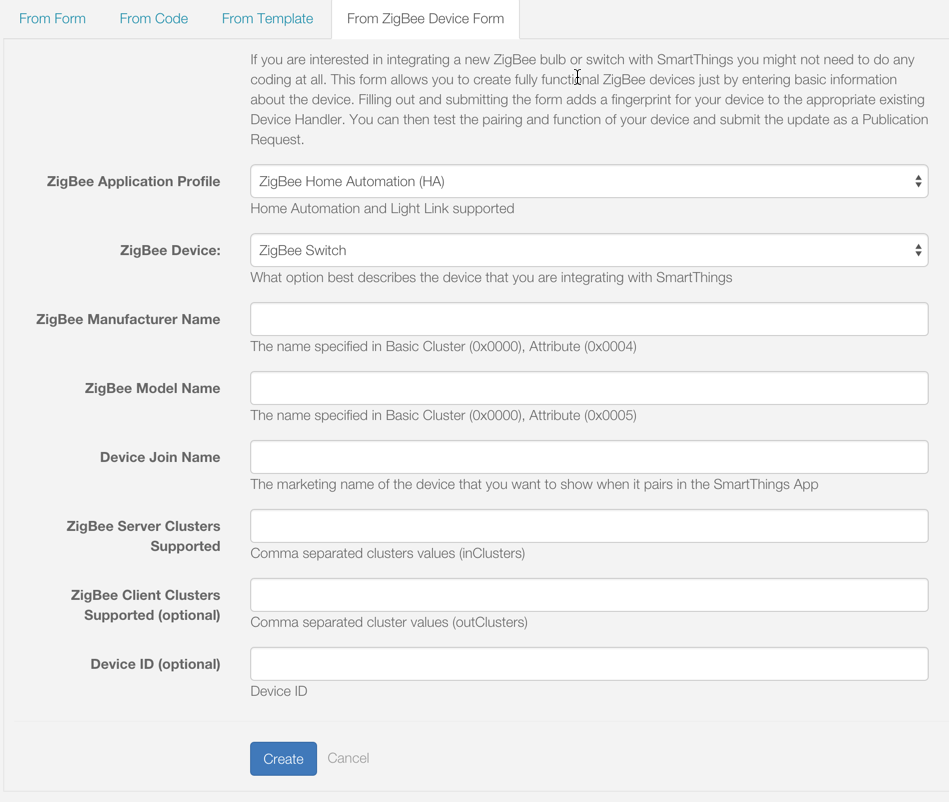
To integrate a new ZigBee switch or bulb with PEA HiVE, you can use the From ZigBee Device Form.
What it does
By entering the ZigBee information for the device in the form, the appropriate existing Device Handler will be updated with the device’s fingerprint.
Use it if
You are the device manufacturer, or otherwise have access to the required ZigBee device information requested on the form.
The device is best described as one of the following:
- ZigBee Switch
- ZigBee Switch with Power
- ZigBee Dimmer/Bulb
- ZigBee Dimmer/Bulb with Power
- ZigBee Color Temperature Bulb
How to use
Simply fill out the required fields in the form with the information for the device, and click Create.
You will then see the updated Device Handler code in the IDE editor. You can then test that your device pairs with PEA HiVE and functions as expected, and then make an update as a Publication Request.